









PSWriteHTML is fork of ReportHTML module. I've forked ReportHTML due to it being outdated and not maintained. I also wanted to address some problems it has and add more features. As it stands PSWriteHTML is a complete rewrite and doesn't use the same naming convention as ReportHTML or even the same code, therefore you can have both. Keep in mind the approach to building HTML is much more simplified and I'm adding more and more features.
While you can take sources and use it from here, PSWriteHTML actually is composed of multiple other of my modules. To get it up and running you will need *PSSharedGoods, and PSSharedGoods will need Connectimo and PSWriteColor. While Connectimo or PSWriteColor aren't needed for PSWriteHTML, PSSharedGoods uses them for some of the commands and it will fail without them. You can get all that from sources but if you just want to use my modules you should use the Install-Module command. It's available in PowerShell 5.1. As an added bonus when I publish modules to PowerShellGallery I remove any junk, minimize modules to a single file which makes them faster to load and use. I really encourage you to use the module from PowerShellGallery and treat GitHub as a highly development version. Since version 0.0.61 when PSWriteHTML is published every dependency is baked into PSWriteHTML. That means you don't need to download any other modules unless you want to contribute to this project.
Install-Module -Name PSWriteHTML -AllowClobber -ForceForce and AllowClobber aren't necessary but they do skip errors in case some appear.
Update-Module -Name PSWriteHTMLThat's it. Whenever there's a new version you simply run the command and you can enjoy it. Remember, that you may need to close, reopen the PowerShell session if you have already used the module before updating it.
The important thing is if something works for you on production, keep using it till you test the new version on a test computer. I do changes that may not be big, but big enough that auto-update will break your code. For example, small rename to a parameter and your code stops working! Be responsible!
Dependencies: PSSharedGoods, PSWriteColor and Connectimo are only used during development. When published to PSGallery / Releases it's a merged release without any dependencies.
- Meet Statusimo – PowerShell generated Status Page
- Meet Dashimo – PowerShell Generated Dashboard
- Dashimo – Easy Table Conditional Formatting and more
- Out-HtmlView – HTML alternative to Out-GridView
- Meet Emailimo – New way to send pretty emails with PowerShell
- All your HTML Tables are belong to us
- Sending HTML emails with PowerShell and zero HTML knowledge required
- Dashimo (PSWriteHTML) – Charting, Icons and few other changes
- Working with HTML in PowerShell just got better
- Comparing two or more objects visually in PowerShell (cross-platform)
- Easy way to create diagrams using PowerShell and PSWriteHTML
- Nested Tabs, Diagram Updates, Diagram Events, Calendar Object and more in PSWriteHTML
- Emailimo merged into PSWriteHTML, IE support and no dependencies
- Active Directory DHCP Report to HTML or EMAIL with zero HTML knowledge
-
0.0.119 - 2020.10.28
- Added ability to use nested lists in
New-HTMLList,EmailList
- Added ability to use nested lists in
-
0.0.118 - 2020.10.27
- Improvements to tab switching very fast which could cause an error #126 DATATABLE warning - Cannot reinitialize DataTable
- Added UseDefaultCredential for
EmailServer
-
0.0.117 - 2020.10.25
- Fix for issue when Charts are used with Diagrams
-
ApexChartsupdate to 3.22 from 3.20.2 -
Vis.jsupdate to 8.4.1 from 8.3.2 - Small update to
New-HTMLListwithReversedparameter - Fix for missing responsive button for
New-HTMLTable - Updates to offline
DataTableslibrary
-
0.0.116 - 2020.10.21
- Charts improvement for
Flexusage (doesn't requirePanelanymore for positioning)
- Charts improvement for
-
0.0.115 - 2020.10.21
- Updates to DataStore Javascript
-
0.0.114 - 2020.10.20
- Small fix to
New-HTMLTablewith DataStoreJavaScript
- Small fix to
-
0.0.113 - 2020.10.19
-
New-HTMLTable- changes/improvements/adds- Reworked JS/CSS loading for DataTables. It should now load less JS/CSS code by default making HTML smaller and more readable especially if not using all features
- Some more work in this area is required. Small breaking change was introduced
- Breaking Change - Renamed
DisableColumnReordertoEnableColumnReorder- The reason for this is that the functionality is most likely used by very few people if at all
- This, in turn, allows me to load JS/CSS for ColumnReordering only when someone requests for this functionality
- Added
EnableRowReorder - Added
EnableKeys(excel like movement) toNew-HTMLTable. Probably could add more options for this via nestedNew-TableXXX - Added
PagingLengthtoNew-HTMLTable. This improvesPagingOptions/DisablePaging.- If user doesn't set Paging Length it will use defaults
- If user doesn't set Paging Options it will use default
@(15, 25, 50, 100) - If user doesn't set Paging Length, but sets different Paging Options such as
@(5,10,15), initial paging length will be set to lowest value5 - If user sets paging options and sets paging length it will set as requested
- Added
EnableScrollertoNew-HTMLTable. This improvesScrollY. It allows to load data as it appears rather than loading everything. Should be plenty useful in JavaScript DataStore for large datasets - Enabling Scroller doesn't require ScrollY enablement, but it will use ScrollSizeY default 500px. You can change it tho.
- Added
EnableAutoFilltoNew-HTMLTable - Improved
New-HTMLTableto load only required CSS/JS (hopefully nothing will be broken) - Updated
Out-HTMLViewwith all new and old parameters to keep it synced with same the features asNew-HTMLTable- hopefully, I didn't break anything - Updated some
DataTablesJS/CSS versions -
New-HTMLTableOptionallows now to defineBoolAsString,NumberAsStringandDateTimeFormat- This only works in
JavaScriptandAjaxJSONdatastore. - This allows one to better control how they want their bools, numbers, and DateTime displayed
- For example:
New-HTMLTableOption -DateTimeFormat "yyyy-MM-dd HH:mm:ss" -BoolAsString - It will make sure all dates are converted to their string representation as requested
- Default DateTime is
yyyy-MM-dd HH:mm:ss - This is possible thanks to
ConvertTo-JsonLiteralwhich is my own implementation ofConvertTo-JSON
- This only works in
- Reworked JS/CSS loading for DataTables. It should now load less JS/CSS code by default making HTML smaller and more readable especially if not using all features
- Navigation Functionality (WIP)
- Added
New-HTMLNavcommand (WIP) - Added
New-HTMLNavLinkcommand (WIP)
- Added
- Wizard Functionality
- Added
New-HTMLWizard - Added
New-HTMLWizardStep
- Added
- Other
- Changed
New-HTMLTextto add5pxmargin. Hopefully things are not affected. - Added
New-HTMLTabPanel- additional way to define tabs - Updated
JustGatefrom 1.3.5 to 1.4.0 - Updated
EnlighterJsfrom 3.0 to 3.4.0 - Small updates to
New-HTMLCodeBlock - Fix for
New-HTMLChartbrokenTitleparameter -
New-HTMLListandNew-HTMLListItemupdated withFontSize
- Changed
-
-
0.0.112 - 2020.10.06
- Fixed issue with x2 PDF Export button - If ScrollY is selected the pdf button is doubled then #154 - tnx Jekastr
- Better handling of empty data in
New-HTMLTable
-
0.0.111 - 2020.10.05
- Added
New-HTMLOrgChart(WIP) - Added
New-OrgChartNode(WIP)
- Added
-
0.0.110 - 2020.09.29
- Fix for
New-HTMLImagemessed up height with width
- Fix for
-
0.0.109 - 2020.09.28
- If no author is provided meta is not added
EmailTextsizeparameter supports the usual settings as described below- Removed
EmailTextand added it as an alias toNew-HTMLTextwhich does the same thing - Renamed
EmailHTMLtoAdd-HTML, addedEmailHTMLas alias - this allows to inline any code wherever it's used - Added
EmailImageas alias toNew-HTMLImage - Added
Inlineswitch toNew-HTMLImage (EmailImage)which embeddes given url/file image directly into HTML - Improved
New-HTMLImage/EmailImage - Prevents errors
New-HTMLTableif null is passed as the first element in DataTable (skips processing)
-
0.0.108 - 2020.09.23
- Added escaping regex for string comparison during
New-TableEvent
- Added escaping regex for string comparison during
-
0.0.107 - 2020.09.23
- Fix for Table Redraw/Calendar Redraw when tab switching/section collapsing
-
0.0.106 - 2020.09.23
- Fix for
New-TableEventnot working properly for column id different than1 - Improvements to
New-TableEventintroducing Source/Target columns with Source Column Names support
- Fix for
-
0.0.105 - 2020.09.23
- Improved
New-HTMLTable- removed page button ifDisablePagingorScrollYis selected - Updated PSD1 to a better version
- Fix for
New-HTMLTablealways forcing to HTML if not global option was used
- Improved
-
0.0.104 - 2020.09.14
- Added
notlike/notcontainsoperators toNew-TableCondition - Fixed
like/notcontainsoperators for JavaScript datasource inNew-TableCondition
- Added
-
0.0.103 - 2020.09.13
- Fix for wrong custom CSS placement
-
0.0.102 - 2020.09.13
- Updates
- Fix for
New-DiagramEventto work whileFontIconsare used - Some improvements to
New-HTMLPanelto better positioning Diagrams - Added Loading Bar to
New-HTMLDiagram. You can disable it using theDisableLoaderswitch.
-
0.0.101 - 2020.09.12
- Updates
- Added
TransposetoNew-HTMLTable/Out-HtmlView
- Added
- Updates
-
0.0.100 - 2020.09.12
- Library updates
- Update to
Apex Chartsfrom 3.20.0 to 3.20.1
- Update to
- Updates
- Fix long-lasting issue with loading
FontIconsin diagrams. Should be visible now. - Support for nested hashtables
ConvertTo-CascadingStyleSheets - Fix/workaround for IE11 issue with section not showing any data, broken in 0.0.99
- Fix long-lasting issue with loading
- Library updates
-
0.0.99 - 2020.09.07
- Notes
-
UTF8will be set by default forHTML.Emailwill pick content encoding fromHTML- It was already set for
HTMLforcharsetso just making sure it's all the same
- It was already set for
- Encoding parameter for
EmailOptionandEmailare DEPRECATED- Whatever you set there doesn't matter - it will always be set to
UTF8. From my tests setting it to anything else messes up display in some clients - While not really breaking change, just thought I would make sure people are aware
- The reason is HTML was always
UTF8and setting it up on transport level toUnicodeor other encodings would break things - In outlook it wouldn't matter as it would fix it, but in other clients such as Thunderbird it would go nuts
- Whatever you set there doesn't matter - it will always be set to
-
- Library updates
- Update to
vis-networkfrom 8.2.1 to 8.3.2
- Update to
- New/Non-Breaking
- Added aliases for
New-HTMLTableOption - Fixes for Request Configuration for Sections and Panels
- Fixes meta tags for HTML4/HTML5
- Addeed NoClosing parameter to
New-HTMLTag - Improvements to
SectionHiding horizontally and vertically - Improvements to diagram resizing when section resizes - should be no need to resize diagram anymore
- Added aliases for
- Notes
-
0.0.98 - 2020.08.30
- New/Non-Breaking
- Added
DataStoreIDtoNew-HTMLTablefor use withDataStore = JavaScript- This allows multiple tables to use the same data. Useful if you want to present the same data in different tables across a single HTML file.
- Fixes for JavaScript datastore and conditional formatting
- Added
- New/Non-Breaking
-
0.0.97 - 2020.08.29
- Breaking changes
- Diagrams
- New-DiagramLink
-
ArrowsToEnabled->nullable boolreplaced withswitch -
ArrowsMiddleEnabled->nullable boolreplaced withswitch -
ArrowsFromEnabled->nullable boolreplaced withswitch -
ArrowStrikethrough->nullable boolreplaced withswitch -
Chosen->nullable boolreplaced withswitch -
FontSize->intreplaced withobject- check notes in0.95 -
FontStrokeWidth->intreplaced withobject- check notes in0.95
-
- New-DiagramLink
- Diagrams
- New/Non-Breaking
- New-DiagramNode
- Exposed
ArrowsToEnabled,ArrowsMiddleEnabled,ArrowsFromEnabled
- Exposed
- Update to Diagram Height accepting multiple size values
- This allows for
New-HTMLDiagram -Height 'calc(100vh - 50px)'which fills whole screen (within section) - Or this
New-HTMLDiagram -Height 'calc(100vh - 50px)' -Width '50vw'although not that useful, as flex fixes most of it
- This allows for
- Updates
New-DiagramOptionsPhysics- exposed a bunch of new options plus help - Updates
New-DiagramOptionsLayout- added some help and new options
- New-DiagramNode
- Updated library
-
Vis-networkto 8.2.1
-
- Breaking changes
-
0.0.96 - 2020.08.28
- It seems SearchPanes from DataTables conflict with
New-HTMLDiagram- Separated that library to be added only on demand
- It seems SearchPanes from DataTables conflict with
-
0.0.95 - 2020.08.27
- Notes
- I'm reworking CSS model in which PSWriteHTML works allowing for more consistent design and more customization options. This means some breaking changes will happen soon enough.
- FontSize will be reworked for most commands (as I get to them) to take
[int]input but also[string]input- If
[int]is provided it assumes size given inpx. If text is provided it takes it as is.- If
15this means15px - If
15pxthis means15px - If
15ptthis means15pt - If
'15'this means15pxas it will convert to[int]first - Anything else will be treated as is meaning you know what you are doing
- If
- If
- Breaking changes
- Default Font Size for everything is
8pt. This includes:- Tabs used to have
15px. Now by default8pt. You will needNew-HTMLTabOption -FontSize '15px'orNew-HTMLTabOption -FontSize 15to set default fontsize for Tabs to it's old value (along with other customizations if needed) - Inputs for Tables (Filtering) having static
8pt
- Tabs used to have
- Default Font Size for everything is
- Improvements
-
New-HTMLMain- allows customizing font size, font type, background color, and text color globally - this will overwrite defaults as described above - Fix TempFilePath for
Emailto work correctly on MacOS/Linux - tnx roberttoups #146 - Auto-wrapping of Tabs is enabled - can be disabled via
New-HTMLTabOption - Bunch of options to control wrapping/direction of tabs via
New-HTMLTabOption - Ability to define
RowElementsinNew-HTMLTabOptionto force number of tabs per row - Fixed BackgroundColor for
New-HTMLTabOption - Removed
default.cssin favor of native powershell css -
New-HTMLTablewarning -Hiding footer while filtering is requested without specifying FilteringLocation to Top or Both - Fixed broken
Tabswitching in Internet Explorer 11 - Added basic support for
SearchPanewithinNew-HTMLTable - Fixed broken
Tablesrefresh onTabswhen using namedTables - Fixed
New-HTMLTable/Out-HTMLViewwith-AllPropertiesdisplaying wrong properties for IDictionary objects - Fixed
New-HTMLTableproperly displaying string/int and other data if passed as a single value - Fixed
New-HTMLTableproperly display ordered dictionary, array of strings, array of singular objects, PSCustomObject with 1 column - Fixed
New-HTMLTableproperly displaying column name asNamein PowerShell 5.1 when used with int/string - Fixed
New-HTMLTextfont size was ignored. Also now supports 15, 15px, 15pt as described in notes. - Resolves peformance issues by adding new parameter
DataStoreforNew-HTMLTableto use with large tables
-
- Added cmdlets
-
New-HTMLTableStyle -
New-HTMLTableOption- added to provideDataStoreparameter which globally sets required store, may be used for other things in future -
New-ChartTimeLine- added basic support for TimeLine Charts
-
- Renamed cmdlets (non-breaking change via aliases)
-
New-HTMLTabOption->New-HTMLTabStyle -
New-HTMLSectionOption->New-HTMLSectionStyle
-
- Library updates
DataTablesand all related librariesJQueryto 3.5.1ApexChartsupdated from 3.18.2 to 3.20FontAwesomeupdated from 5.13 to 5.14
- Notes
-
0.0.94 - 2020.08.18
- Public
- Added
New-TableEventforNew-HTMLTableexperimental
- Added
- Public
-
0.0.93 - 2020.08.16
- Public
- Fixes
- Fix for
New-HTMLTabOptionswitch "-SelectorColor" sets the color permanently #128 - Fix for
InvokeHTMLTagsinNew-HTMLTable- replacement of (&to&) and ( to<space>)- Before it would try to change from
'&nbsp;to<space>which is wrong. Hopefully, nothing will be broken after that
- Before it would try to change from
- Fix for
- Improvements
- Choosing colors should be easier (wildcard added before and after)
- Make it optional for
New-HTMLTabto force TextTransform (uses global) -
New-HTMLSection/New-HTMLPanelwere updated to support additional options
- New
- Added
ConvertTo-CascadingStyleSheets- converts hashtable into CSS - Added
New-HTMLSectionOption- experimental - Added
New-HTMLPanelOption- experimental - Added
AnchorNamefor sections and panels - Added
New-HTMLAnchor/New-HTMLLink
- Added
- Fixes
- Internal
- Support internally for
Custom Header CSS,Custom Footer CSS
- Support internally for
- Public
-
0.0.92 - 2020.08.08
- Fixes
New-HierarchicalTreeNodenot recognized in latest modules #141
- Fixes
-
0.0.91 - 2020.08.03
- Refreshing release - fix for Remove-EmptyValue
-
0.0.90 - 2020.07.27
- Added
New-TableColumnOptionforNew-HTMLTable- tnx zsoch #138 - Removed dead/old
FullCalendarjs code - Updated
JustGageto 1.3.5
- Added
-
0.0.89 - 2020.07.23
- Fix for Tooltips in FullCalendar 5.1 - tnx smasterson #137
-
0.0.88 - 2020.07.21
- Updated
New-HTMLCalendarwith more options forInitialViewparameter - tnx smasterson #135
- Updated
-
0.0.87 - 2020.07.20
- Updated FullCalendar library to 5.1 from 4.3
New-HTMLCalendar- removedpluginsparameter (no longer required)New-HTMLCalendar- removedWeekNumbersWithinDays(no longer required)New-HTMLCalendar- addedInitialViewparameter- Fixed Tabs switching with multiple tables on each tab fails #134
- Fixed Tabs switching with calendars #133
-
0.0.86 - 2020.07.14
- Fix for missing
Get-TemporaryDirectoryduring merge - damn nested ASTTokens - Module is now signed (hopefully that doesn't break anything)
- Fix for missing
-
0.0.85 - 2020.06.27
- Update
New-HTMLSpanStylewith some protection for errors - Fix from PSSCriptAnalyzer - The Variable 'Event' is an automatic variable that is built into PowerShell, assigning to it might have undesired side effects. If the assignment is not by design, please use a different name.
- Update
-
0.0.84 - 2020.06.11
Colorsautocompleter should be now a bit smarter- Added
OnlinetoEmailBody EmailBodycan be used separately now to generate HTML in case someone would like to use it with their own Send Email- Say .. using
Mailozaurr(new PowerShell module)
- Say .. using
EmailhasOutputHTMLparameter which can send email but also output HTML for whatever reason
-
0.0.83 - 2020.05.27
- Fix for
New-HTMLMainand junk code showing up in HTML
- Fix for
-
0.0.82 - 2020.04.23
New-HTMLTableadded ability to define Title which will be used as the filename when exporting- If no Title is defined title is used from
New-HTML - If no Title is provided name of button will be used (default)
- If no Title is defined title is used from
New-TableButtonXXXalso haveTitlefield which allows different naming for buttons
-
0.0.81 - 2020.04.18
New-HTMLDiagramkeeps expanding without height bug fixed (#113) with huge help from Thomaash
-
0.0.80 - 2020.04.13
- DEPRECATED:
UseJavaScriptLinksandUseCssLinksforNew-HTML. UseOnlineswitch instead. - Updated Vis.JS to 7.5.2
- Updated FontAwesome to 5.13 and hopefully made it available offline
- Updated ApexCharts to 3.18.1
- Changed default for Email to Offline. Use
Onlineswitch to minimize content. New-HTMLTable-HideButtons added #114
- DEPRECATED:
-
0.0.79 - 2020.03.24
- Typo fixes for Suppress
- Added
AutoSizeparameter forNew-HTMLTable/EmailTable Out-HtmlViewswitched toOfflinemode by default. AddedOnlineswitch.- Considering same approach to New-HTML (by default it's offline, but naming convention
UseJavaScriptLinksandUseCssLinksis a bit weird)
- Considering same approach to New-HTML (by default it's offline, but naming convention
-
0.0.77 - 2020.03.04
- Updates to New-HTMLStatusItem #111 - tnx jimmy58663
- Support for FontAwesome, More colors and Hex.
- Fixes to New-HTMLHeading color property being empty
- Updates to New-HTMLStatusItem #111 - tnx jimmy58663
-
0.0.76 - 2020.02.07
- Added -PreventShowHTML to Out-HtmlView for quick use with Path.
-
0.0.75 - 2020.02.07
- Improvment for very long words in New-HTMLTable and New-TableContent using WordBreak parameter - issue #107
-
0.0.74 - 2020.01.26
-
0.0.73 - 2020.01.20
- Fix for Out-HtmlView erroring out if Table was not given (or null)
-
0.0.72 - 2020.01.13
-
0.0.71 - 2019.12.26
-
0.0.70 - 2019.12.19
- Library update
- JQuery to 3.4.1
- ApexCharts to 3.11.1, and set a static version (instead of the latest)
- Added New-HTMLTree, New-TreeNode (basic preview)
- Added New-HTMLHeader, New-HTMLFooter, New-HTMLMain allowing adding content before Tabs or after all content. (#74)
- Library update
-
0.0.69 - 2019.12.10
- Fix for EmailList #90 - tnx natosullivan
- Added New-HTMLGage, New-GageSector
-
0.0.68 - 2019.12.07
- Library update
- Vis-Network to 6.4.6
- Diagrams now work in Internet Explorer (yay!)
- Add Tab border customization and Tab header background color (tnx xlrod!) #87
- New-HTMLTabOption -SlimTabs -SelectorColor Blue -BorderRadius 25px -BorderBackgroundColor LightBlue
- Added Tests so basic stuff is tested for regression (it's very basic)
- Added alias for New-TableConditon (TableCondition)
- Library update
-
0.0.67 - 2019.11.26
-
0.0.66 - 2019.11.25
-
0.0.65 - 2019.11.23
- Fix for Hashtable/OrderedDictionary display in New-HTMLTable/Out-HTMLView
-
0.0.64 - 2019.11.21
- Added TextTransform for New-HTMLTab (thx xlrod!)
-
0.0.63 - 2019.11.17
- Fix for WhatIf in Email affecting other places. It should only affect sending emails.
-
0.0.62 - 2019.11.12
- IE doesn't require approving running scripts anymore! (tnx orzfly)
-
0.0.61 - 2019.11.11
- New colors (tnx Ferdi), along with the ability to use #HEX as color codes
- Emailimo integrated into PSWriteHTML
- PSSharedGoods is no longer a dependency
- The way it works is that during development it still is dependency, but during publish it gets merged into one package using PSPublishModule
-
0.0.60 - 2019.11.05
- Fix for IE 11 support of collapsable sections
- Fix for nested, invisible sections not working properly
-
0.0.59 - 2019.10.29
- Library update
- DataTables upgrade to Nightly (1.10.21-dev) due to broken Table Conditioning. Works with IE as well.
- Library update
-
0.0.58 - 2019.10.28
- Library update
- Vis-Network to 6.3.0 (known issue - IE not working)
- DataTables downgrade to 1.10.12 for IE to work
- Fix for IE 11 support of Tabs
- Fix for IE 11 support of Tables (Out-HTMLView/New-HTMLTable)
- Fix for Section that starts as Collapsed #47
- It's a heavy fix, meaning it can have perf impact on display - may need changes
- Added New-TableRowGrouping
- Allows grouping within New-HTMLTable
- Library update
-
0.0.57 - 2019.10.13 - Blog post about release
- Changes to Tabs
- Fix for missing comma in Tabs
- Fix for Tab Selector Color not being applied after changing to Nested Tabs
- Fix for Tab Selector not being Active by default
- Changes to Tables
- Updated Table Row size to 20px from 27px
- Renamed New-HTMLTablecommands to New-Table to better reflect what they deliver (and those don't deliver HTML)
- Old commands still available as aliases
- Added Calendar
- Added New-HTMLCalendar
- Added New-CalendarEvent
- Added HierarchicalTreeView - very basic implementation. Not sure it will stick as Diagrams have that option as well Requires feedback
- Added New-HTMLHierarchicalTreeView
- Added New-HierarchicalTreeNode
- Changes to Diagrams
- Updated Visjs to 6.1.1 (local version), linked version is always the newest
- Added New-DiagramEvent for linking Tables with Diagrams
- Fix for Diagram Size
- Fix for using diagram defaults (smaller size), should work better now
- Changes to Tabs
-
0.0.55 - 2019.09.29
- Fix for Underlined space when using -Collapsable #51 - Thanks Tuxhedoh
- Fix for Stacked Charts #59 - Thanks for reporting colin-hall
- Fix for Section -Invisible switch
- Fix for Section impacting charts positioning
- Added BackgroundImage,BackgroundImageSize for New-HTMLDiagram (doesn't work for Export)
- Added Nested Tabs
-
0.0.54 - 2019.09.29 - Blog Post about release
- Support for Diagrams
- Font Awesome updated to 5.11.2
- Enlighter updated to 3.0
- Dashimo integrated to PSWriteHTML as aliases
-
0.0.53 - 2019.09.19
- Bugfix chart inverse colors #42 - Thanks Ferdi Weiner
-
0.0.52 - 2019.09.07
- Library updates:
- ApexCharts update 3.8.5
- New-HTMLChart
- Removed Positioning parameter
- Added New-ChartPie
- Added New-ChartRadial
- Added New-ChartDonut
- Added few parameters to New-HTMLChart
- Library updates:
-
0.0.51 - 2019.09.05
- New-HTMLCode
- Added some formatting of whitespaces for code
- New-HTMLCode
-
0.0.50 - 2019.08.30
- Add-TableContent
- Fix for a typo on LE (tnx gregwold)
- Add-TableContent
-
0.0.49 - 2019.08.25 - Blog post about release
- Save-HTML
- Moved some warnings to Verbose
- Fixed weird message
- New-HTMLTable, Out-HTMLView
- Added AllProperties switch
- Added Compare/Replacements
- Save-HTML
-
0.0.48 - 2019.08.11
- I don't know. Got confused about what was changed :-p
-
0.0.47 - 2019.08.04
- Fix for LOGO in PowerShell Core
- New-HTMLTable
- Added ImmediatelyShowHiddenDetails switch - Responsive has the ability to display the details that it has hidden in a variety of different ways. Its default is to allow the end-user to toggle the display by clicking on a row and showing the information in a DataTables child row. At times it can be useful not to require end-user interaction to display the hidden data in a responsive manner, which can be done with the childRowImmediate display type.
- Fix for New-HTML wrong positioning in certain conditions - bug introduced in 0.0.46
- Fix for Table Simplify with margins
-
0.0.46 - 2019.08.04 - Blog post about release
- New-HTMLMessage - Removed as not ready, useless
- New-HTMLTable
- Disable Paging when amount of objects to display is lower then PagingOptions
- Added DataTableID for special use cases
- New-HTMLTableContent - Added with plenty of new features
- New HTMLTableConditionalFormatting - Added inline parameter
-
0.0.45 - 2019.07.09
- New-HTMLTable
- Added $PriorityProperties parameter - it works also on ScrollX and other types of places contrary to ResponsivePriorityProperties which only works on Responsive Table
- It was moved from Out-HtmlView
- Out-HTMLView
- Updated with all features from New-HTMLTable as it's useful to use it for fast output
- New-HTMLTable
-
0.0.44 - 2019.07.08
- New-HTMLTable
- Small improvement when no data provided
- New-HTMLTableCondition
- Supports contains now - PR by Adam Cook (codamok)
- Removed ColorSchemes - removal of ReportHTML old code
- New-HTMLTable
-
0.0.43 - 2019.07.01
- New-HTMLTable
- Fix for ScrollX with low amount of columns
- New-HTMLTable
-
0.0.42 - 2019.07.01
- New-HTMLTableConditionalFormatting
- Fix for Powershell Core, where conditional formatting wouldn't show up
- New-HTMLTableConditionalFormatting
-
0.0.41 - 2019.06.30
- New-HTMLTableHeader - removing need for AddRow switch
- If used with only Title it will assume AddRow
- If used with Names it will assume merging
- If used with Names without Title it will assume styling
- Left AddRow for compatibility reasons, may remove it in future
- New-HTMLTableHeader - removing need for AddRow switch
-
0.0.40 - 2019.06.29 - Blog post about release
- New-HTMLTable features
- FixedHeader/FixedFooter options
- Scrolling
- ScrollX,
- ScrollY, ScrollSizeY
- FreezeColumnsLeft, FreezeColumnsRight
- ResponsivePriorityOrder, ResponsivePriorityOrderIndex
- New-HTMLTableHeader - new command
- Merging header, styling header, adding header row
- New-HTMLTable features
-
0.0.39 - 2019.06.20
- Fix for DefaultSortColumn
- Fix for DefaultSortOrder when set to descending
-
0.0.38 - 2019.06.17 - Blog post about release
- Added support for Bar Charts/Line Charts
- Added support for icons in tabs
- Added support for controlling tabs
- Fixes for tables in multiple places
- Ability to control buttons behavior
- Many many more, it's a big release
-
0.0.34 - 2019.06.02
- Fix for New-HTMLListItem to support multiple Texts
-
0.0.33 - 2019.05.28
- New-HTMLTable - Sorting ordered for DateTime - PR by Ferdi Weiner (ferwe)
- Removed New-HTMLChart temporary as it will be rebuilt
- complete rewrite
- faster report building (from 20+ seconds to 0-2 seconds)
- updated libraries
- bunch of different, new features
- easier building HTML
Matthew Quickenden (@lucidqdreams) - author of ReportHTML - without him this wouldn't be possible.
- Statusimo is a PowerShell module that is able to generate a Status Page entirely from PowerShell.
- Dashimo is a PowerShell module that makes generating Dashboards, nice looking HTML, a breeze.
- Emailimo is a PowerShell module that makes writing nice looking HTML emails, easy!
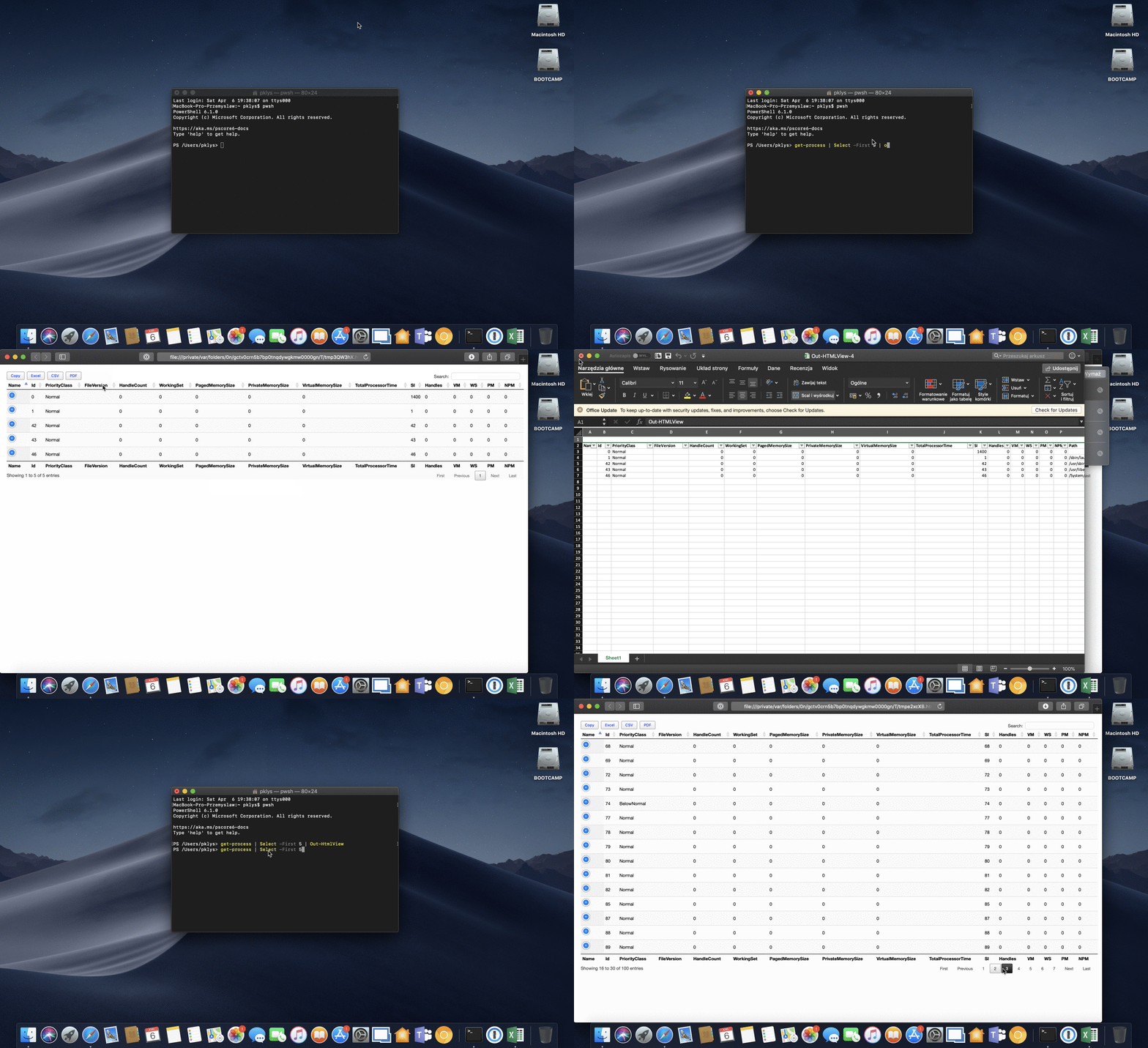
- Out-HTMLView is a PowerShell cross-platform command alternative to Out-GridView
Following external libraries and frameworks are in use. They make PSWriteHTML what it is now. This list is dynamic and doesn't cover everything yet.
For colors, you can visit this online page.
PSWriteHTML uses some 3rd party libraries to deliver its functionality. It requires those. There are two ways to use it
- With links to CSS/JS which makes code cleaner and easy to see what is happening
- With code inline in HTML which makes HTML much bigger
Below you can find some of the 3rd party libraries being used.
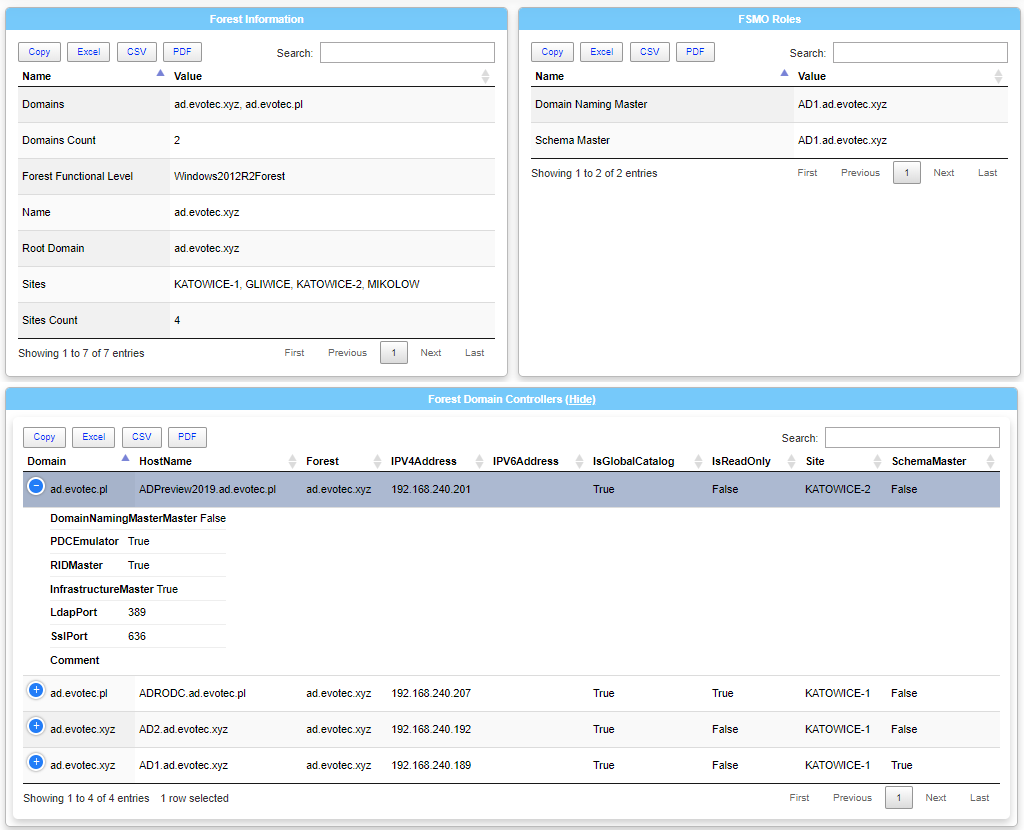
Following JS Framework is integrated as part of this module. It's responsible for building Tables
- Downloaded from https://datatables.net/download/
- Styling Framework:
- DataTables' default styling.v1.10.18
- Selected Packages:
- jQuery 3 DataTables requires jQuery. Don't select either version if you already have it.v3.3.1
- Enhance HTML tables with advanced interaction controls.v1.10.18
- Extensions:
- AutoFill Excel-like click and drag copying and filling of data.v2.3.2
- Buttons A common framework for user interaction buttons.v1.5.4
- Column visibility End user buttons to control column visibility.v1.5.4
- Flash export Create Excel, PDF, CSV files and copy data from the table. For legacy browsers.v1.5.4
- HTML5 export Copy to clipboard and create Excel, PDF and CSV files from the table's data.v1.5.4
- JSZip Required for the Excel HTML5 export button.v2.5.0
- pdfmake Required for the PDF HTML5 export button.v0.1.36
- Print view Button that will display a printable view of the table.v1.5.4
- ColReorder Click-and-drag column reordering.v1.5.0
- FixedColumns Fix one or more columns to the left or right of a scrolling table.v3.2.5
- FixedHeader Sticky header and / or footer for the table.v3.1.4
- KeyTable Keyboard navigation of cells in a table, just like a spreadsheet.v2.5.0
- Responsive Dynamically show and hide columns based on the browser size.v2.2.2
- RowGroup Show similar data grouped together by a custom data point.v1.1.0
- RowReorder Click-and-drag reordering of rows.v1.2.4
- Scroller Virtual rendering of a scrolling table for large data sets.v1.5.0
- Select Adds row, column and cell selection abilities to a table.v1.2.6
JSZip and PDFMake are not downloaded as part of this package. They fail to import properly hence they are not bundled as one minified version.
- Extensions:
- Downloaded from https://github.com/Stuk/jszip (3.1.5)
- JSZip Required for the Excel HTML5 export button.v2.5.0
- DataTables Package https://datatables.net/download/ but with separate file
- pdfmake Required for the PDF HTML5 export button.v0.1.36
- ChartJS Package - https://github.com/chartjs/Chart.js/releases
- ChartJS - version 2.7.3 (required for charts)
- Downloaded from https://github.com/Stuk/jszip (3.1.5)
PSWriteHTML provides built-in EnlighterJS JavaScript. It's responsible for building Code Blocks
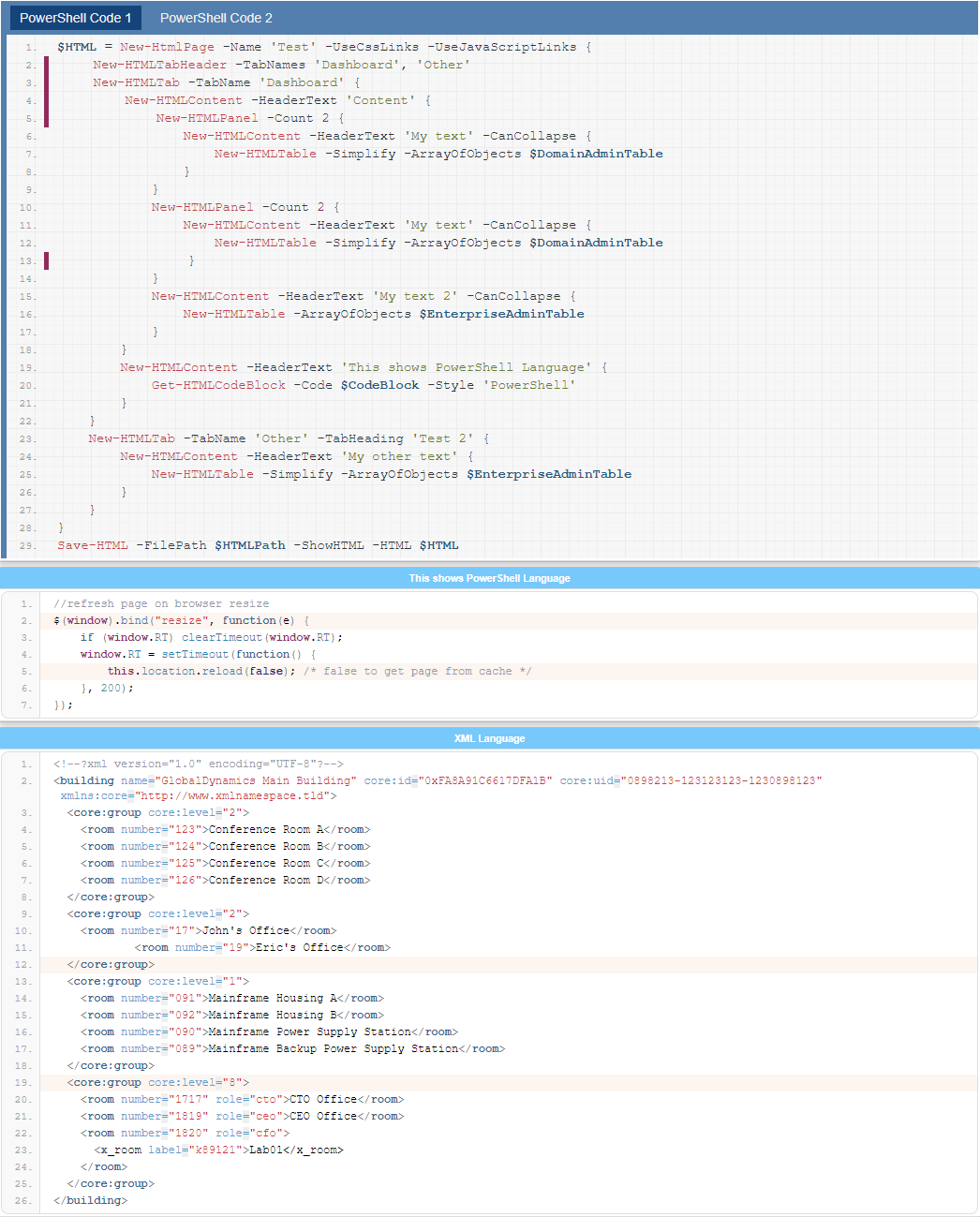
This allows for code blocks support. Currently, it uses Release Candidate version as its the first version to support PowerShell highlighting and many additional languages. It will be updated to the new version
- Downloaded from https://github.com/EnlighterJS/EnlighterJS
- Assembly (assembly, asm)
- AVR Assembly (avrassembly, avrasm)
- C/C++ (c,cpp, c++)
- C# (csharp)
- CSS (css)
- Cython (cython)
- CordPro (cordpro)
- diff (diff)
- Dockerfile (docker, dockerfile)
- Generic (generic, standard) - default highlighting scheme
- Groovy (groovy)
- Go (go, golang)
- HTML (html)
- Ini (ini, conf)
- Java (java)
- Javascript (js, javascript, jquery, mootools, ext.js)
- JSON (json)
- Kotlin (kotlin)
- LESS (less)
- LUA (lua)
- Markdown (gfm, md, markdown)
- Matlab/Octave (octave, matlab)
- NSIS (nsis)
- PHP (php)
- Powerhsell (powershell)
- Prolog (prolog)
- Python (py, python)
- RAW (raw) - raw code without highlighting with EnlighterJS container styles!
- Ruby (ruby)
- Rust (rust)
- SCSS (scss, sass)
- Shellscript (shell, bash)
- SQL (sql)
- Squirrel (squirrel)
- Swift (swift)
- Typescript (typescript)
- VHDL (vhdl)
- VisualBasic (visualbasic, vb)
- XML (xml)
- YAML (yaml)
- Enlighter (enlighter, standard) - Enlighter`s default Theme
- Classic (classic) - SyntaxHighlighter inspired
- Bootstrap (bootstrap4) - Bootstrap 4 inpired themes, high contrast
- Beyond (beyond) - BeyondTechnology Theme
- Godzilla (godzilla) - A MDN inspired Theme
- Eclipse (eclipse) - Eclipse inspired
- MooTwo (mootwo) - Inspired by the MooTools Website
- Droide (droide) - Modern, minimalistic
- Minimal (minimal) - Bright, High contrast
- Atomic (atomic) - Dark, Colorful
- Dracula (dracula) - Dark, using official draculatheme colorscheme
- Rowhammer (rowhammer) - Light, Transparent, divided rows
- Downloaded from https://github.com/visjs/vis-network