Software
The project consist of 4 different software components.
- AVR Firmware
- AVR Bootloader
- Snes Loader
- Upload client
The main software is the AVR based firmware and the second is a bootloader that lives on the cartridge for firmware updates. The firmware does the housekeeping for the rom upload and SNES controlling. There is a SNES based loader client compressed in the AVR firmware that visualize the upload process. When the cartridge is inserted and the SNES is powered up, the loader will pop up and wait for a rom to be uploaded. The last component is the upload client that runs on the pc side to upload the rom.
Install Upload Client
We mainly use ucon64 as the upload tool for the Quickdev16. Since version 2.0.1 ucon64 has official Quickdev16 support. You can easily build it form source for OS X and Linux. Or just grab the binary downloads. Its recommend for windows users to use the binary version from the ucon64 website.
Plug the Quickdev16 into the SNES and power it on. Connect the Quickdev16 via an USB mini cable to your computer. After a couple of seconds you should see a new USB device.
Linux
If you want to compile ucon64 from source you need to install libusb. To compile ucon64 form source just
tar -xzvf ucon64-2.0.2-src.tar.gz
cd ucon64-2.0.2-src/src
CFLAGS=$(libusb-config --cflags)
LDFLAGS=$(libusb-config --libs)
./configure --with-libusb
make
Once you installed ucon64 you should add an udev rule to /lib/udev/rules.d/50-udev-default.rules to avoid running ucon64 as root.
SUBSYSTEM=="usb", ATTR{idVendor}=="16c0", ATTR{idProduct}=="05dd",MODE="0660", GROUP="plugdev".
Then lsusb should show something like this
Bus 020 Device 008: ID 16c0:05dd 16c0 QUICKDEV16
OS X
If you want to compile ucon64 from source you need to install libusb.
brew install libusb
To compile ucon64 form source just
tar -xzvf ucon64-2.0.1-src.tar.gz
cd ucon64-2.0.1-src/src
CFLAGS=$(libusb-config --cflags)
LDFLAGS=$(libusb-config --libs)
./configure --with-libusb

make
On OS X system_profiler SPUSBDataType hould show something like this
            QUICKDEV16:

              Product ID: 0x05dd
              Vendor ID: 0x16c0
              Version: 1.00
              Speed: Up to 1.5 Mb/sec
              Manufacturer: optixx.org
              Location ID: 0x14520000 / 8
              Current Available (mA): 500
              Current Required (mA): Unknown (Device has not been configured)
Windows
Once you installed the ucon64 binary version you need to install the USB driver for the Quickdev16. On Windows 32-bit systems you need to install this INF and on 64-bit system this CAT file so that the Quickdev V-USB based gets recognized by the system.
Upload Rom File
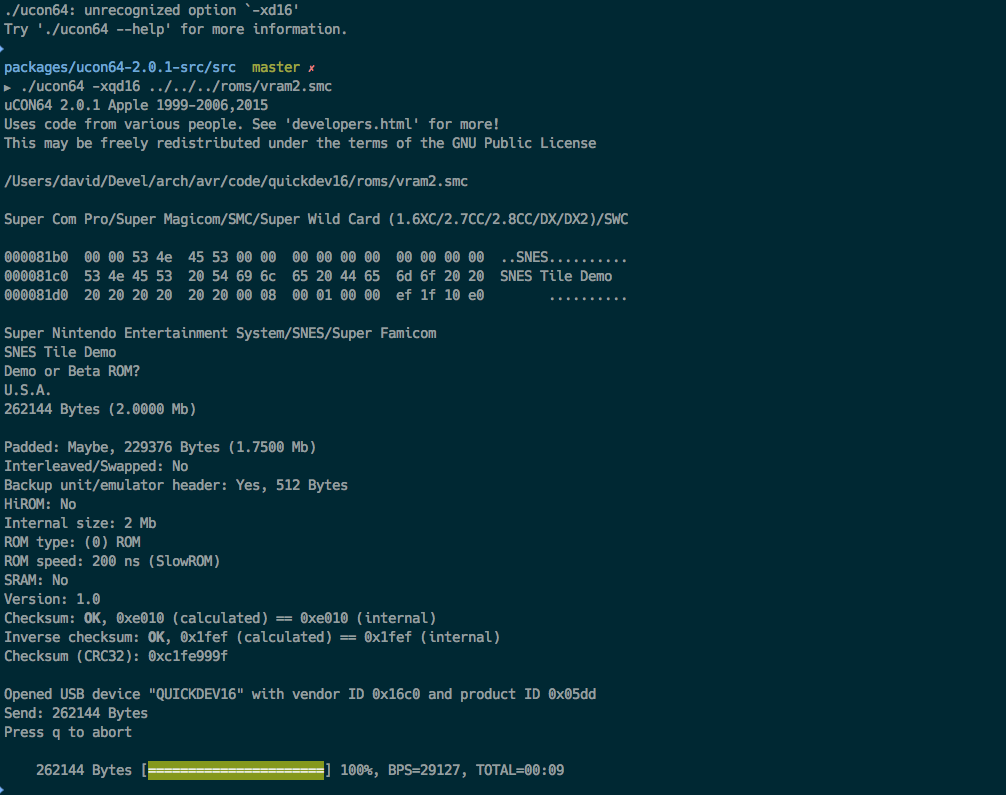
Connect your Quickdev16 via a mini USB cable and the use ucon64 to upload a rom.
ucon64 --xqd16 rom.smc