Push notification from Xcode on build complete using PushBullet app.
Aren't you boring to wait computer while compiling Swift code? My project will helpful. Now you can enjoy your leisure compile time.

-
Download the PushBullet app (https://www.pushbullet.com/apps).
- Create an account.
- Under my account on the website, create access token (https://www.pushbullet.com/#settings/account).
-
Clone this repository.
- Save access token with
config-PushBullet.sh <your-pushbullet-access-token>command.
- Save access token with
- Clone this repository.
- Save KakaoWork webhook url with
config-KakaoWork.sh <webhook-url>command. - Save Slack webhook url with
config-Slack.sh <webhook-url>command.
- Save KakaoWork webhook url with
-
In Xcode, go to Preferences -> Behaviors.
- Under Build -> Start, add
build-start.shto Run. - Under Build -> Succeeds, add
build-succeeded.shto Run. - Under Build -> Fails, add
build-failed.shto Run. - Press '+' button on the left bottom to create new behavior under Custom.
- Name it anything you want. (e.g.)
Notify Build Result - Specify shortcut to anthing you want. (e.g.)
Shift+Ctrl+Option+Cmd+N - Add
notifyBuildResult.shto Run.
- Under Build -> Start, add
-
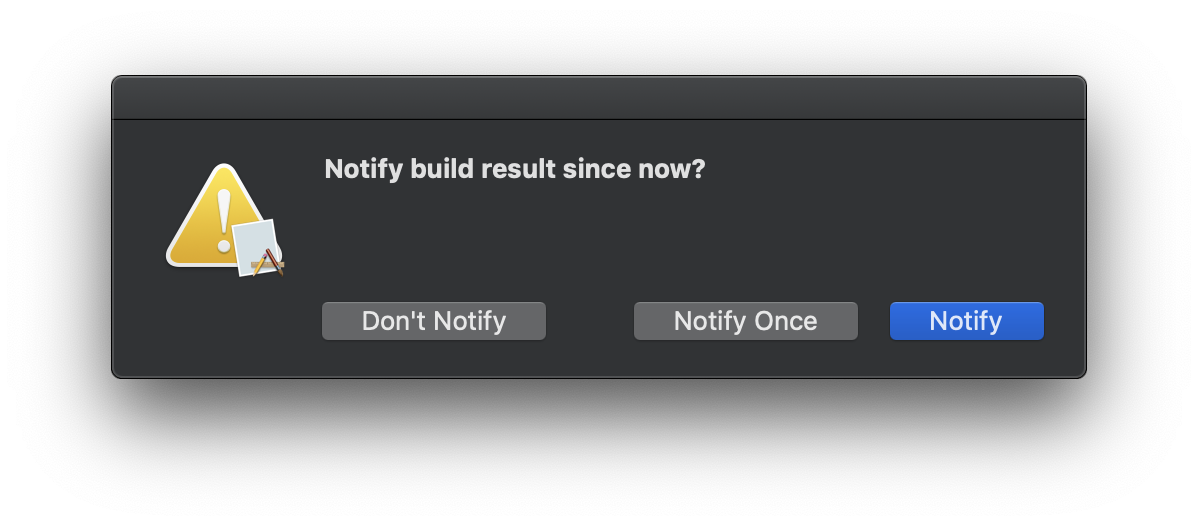
Press shortcut key you specified to custom behavior in Xcode. You will see:
- You can choose:
Notifyto receive notifications of all build result since now.Notify Onceto receive notifications of build result until build succeeded once.Don't Notifynot to receive notifications no longer.
- You can choose:
-
Enjoy your leisure compile time

- Remove
$HOME/.NotifyBuildResult/directory. - Remove cloned repository.