
A simple FM radio using Arduino and TEA5767 FM Radio Module with an OLED display and rotary encoder to tune radio stations.
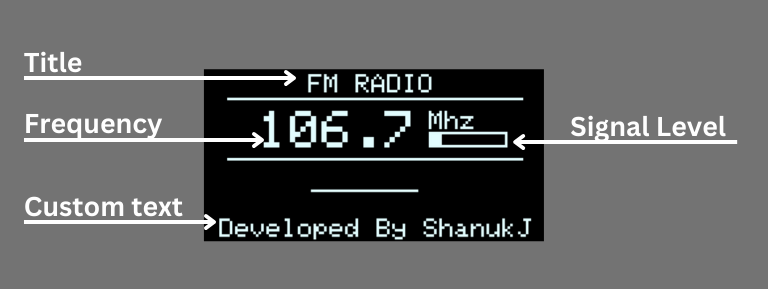
Radio Tuning: Using the rotary encoder, you can adjust the radio frequency between 87.5 MHz and 108 MHz.
Frequency Storage: The program utilizes the EEPROM library to store the last tuned frequency. This ensures that when the device is restarted, it starts at the last tuned frequency.
Signal Strength Display: The program displays the signal strength on the OLED display, represented by a series of bars.
Stereo Indicator LED: There's an LED connected to pin 6 (LED_PIN) that indicates whether the radio signal is in stereo or not. The LED is turned on when the signal is in stereo mode and turned off otherwise.
Install required libraries using the following repositories
Arduino Library for the TEA5767 Radio Module: https://github.com/big12boy/TEA5767
Arduino library for SSD1306 monochrome 128x64 and 128x32 OLEDs: https://github.com/adafruit/Adafruit_SSD1306
Adafruit GFX graphics core Arduino library: https://github.com/adafruit/Adafruit-GFX-Library
TEA5767 FM Radio Module: https://s.click.aliexpress.com/e/_Dm6IihX
Arduino Nano: https://s.click.aliexpress.com/e/_DlCrJc1
OLED Display Module: https://s.click.aliexpress.com/e/_DdRoR0p
Rotary Encoder: https://s.click.aliexpress.com/e/_DB7joUl
Amplifier Module TDA2030A: https://s.click.aliexpress.com/e/_DCfpBN3
Open fm_radio.ino inside the fm_radio folder using Arduin IDE. Select your board and port and upload.

Arduino Nano: Connect 5V to 5V, GND to GND.
TEA5767 FM Radio Module: Power it using the Arduino's 5V and GND. SDA pin of the TEA5767 module to the SDA (A4) pin of Arduino. SCL pin of the TEA5767 module to the SCL (A5) pin of Arduino.
SSD1306 OLED Display: Connect VCC to 3.3V or 5V (based on the display specifications), GND to GND, SDA to A4 (SDA), and SCL to A5 (SCL).
Rotary Encoder: Connect CLK to Pin 2, DT to Pin 3, and SW to Pin 4 of the Arduino Nano.
LED: Connect Anode (+) of the LED to a 1K resistor and then to Pin 6 of Arduino. Cathode (-) of the LED to GND pin of Arduino.
👤 ShanukJ
- Twitter: @Dev_Jay98
- Github: @ShanukJ
- LinkedIn: @shanukj
Give a ⭐️ if this project helped you!
This README was generated with ❤️ by readme-md-generator