SF Motor Control is a C++-based motor control project designed to communicate with SF series motor controllers via the CAN bus, enabling precise motor control.
Complete Tutorial + Development Board and Motor Purchase Links(https://files.seeedstudio.com/wiki/robotics/Actuator/stackforce/Hardware_connect.png)
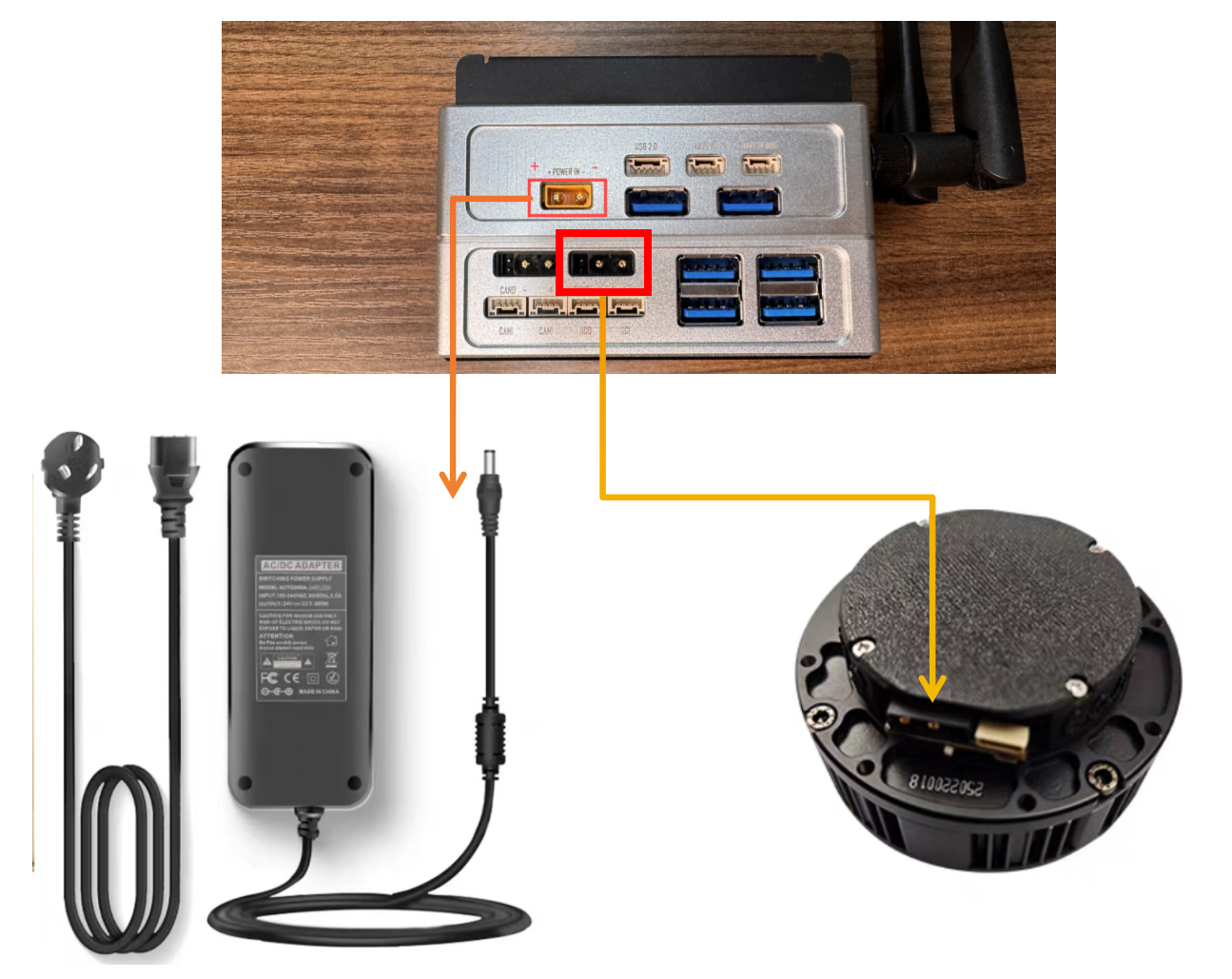
This project provides functionality to control SF series motors through the CAN bus. It supports motor enable/disable, zero position setting, and the MIT (Motor Identity Transform) control mode. The MIT control mode allows users to directly set motor position, velocity, Kp, and Kd parameters.
The project provides implementations in both C++ and Python.
- Supports full control of SF series motors (enable/disable/zero setting)
- Implements MIT control mode for precise control of motor position, velocity, and torque
- Supports multi-motor control (up to 4 motors)
- Provides real-time feedback, including actual motor position, velocity, and torque
- Offers both C++ and Python implementations
- Host system with CAN bus support (e.g., Jetson Nano, Raspberry Pi)
- SF series motors and corresponding drivers
- CAN bus transceiver
- C++17 compatible compiler (e.g., GCC 7+)
- CMake 3.10+
- Linux system (requires socketCAN support)
- Python 3.6+
Before running the program, ensure that the CAN interface is correctly configured. For example, for the can0 interface:
sudo ip link set can0 up type can bitrate 1000000
sudo ip link set can0 upcd build
cmake ..
makeThe compiled executable will be located at build/sfmotor_control. Run the program with:
./sfmotor_controlBy default, the program controls the motor with ID 0x01. During execution, you can input target angle values via the keyboard.
Python scripts are located in the script/ directory and can be run directly without compilation.
python main.py SFmotor_control/
├── include/ # Header and implementation files
│ ├── CAN_comm.cpp # CAN communication implementation
│ ├── CAN_comm.h # CAN communication interface definitions
│ ├── CAN_twai.cpp # TWAI protocol implementation
│ └── CAN_twai.h # TWAI protocol interface definitions
├── script/ # Python control scripts
│ ├── __init__.py
│ ├── main.py # Python example main program
│ └── sf_can_controller.py # Python CAN controller implementation
├── src/ # C++ main program source code
│ ├── config.h # Configuration and data structure definitions
│ └── main.cpp # Main control program
└── CMakeLists.txt # CMake build configuration
This project implements a dedicated CAN communication protocol for SF series motors:
- Uses standard CAN frames (11-bit identifiers)
- Supports multiple function codes (NMT, RPDO, TPDO, etc.)
- MIT control mode uses a proprietary data format
| Function Code | Value | Purpose |
|---|---|---|
| NMT | 0x000 | Network management |
| RPDO1 | 0x200 | Real-time process data out |
| TPDO1 | 0x180 | Real-time process data in |
- Enable Command: Sends an enable signal via the NMT function code
- Disable Command: Sends a disable signal via the NMT function code
- MIT Control Command: Sends position, velocity, Kp, Kd, and torque parameters via RPDO1
Main functions include:
CANInit()- Initialize the CAN interfaceenable(uint8_t nodeID)- Enable the motor with the specified IDdisable(uint8_t nodeID)- Disable the motor with the specified IDsendMITCommand(uint8_t nodeID, MIT command)- Send an MIT control commandrecCANMessage()- Receive CAN messages
Main class and methods:
-
MotorControllerclassenable()- Enable the motordisable()- Disable the motorsend_mit_command(pos, vel, kp, kd, tor)- Send an MIT control commandpoll_rx()- Poll and receive CAN messages
- Ensure that the CAN interface is properly configured and started before running the program
- Motor control involves high-power equipment—pay attention to electrical safety
- The project currently assumes the CAN interface name is
can0; modify the source code if different - Control parameters (such as Kp and Kd) must be tuned according to the specific application
Common issues and solutions:
-
Unable to open CAN interface
- Check whether the CAN interface is correctly configured and started
- Confirm that the interface name matches (default is
can0)
-
Unable to communicate with the motor
- Check the physical CAN bus connections
- Confirm that the motor ID settings are correct
- Verify that the CAN baud rate settings match
-
Poor control performance
- Adjust PID parameters (Kp, Kd)
- Check the mechanical connection between the motor and the load
- Ensure a stable power supply voltage

